


Priceline: Hotel, Flight & Car
4.862.31K Reviews
App Specs
- Version
- 17.4.394
- Updated On
- License
- Free
- Downloads
- 10,000,000+
- Developer
- priceline.com
- Categories
- Travel & Local
- Platform
- Android, iOS
Screenshots

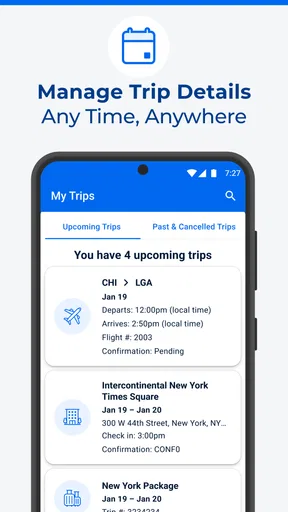
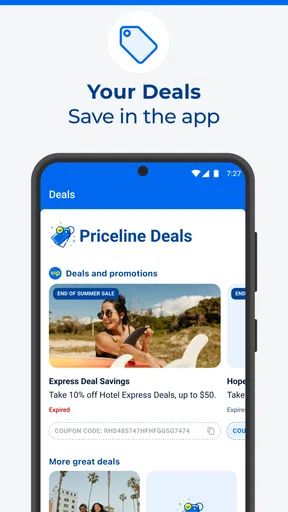
 Analysis by AppCompare
Before I decide whether a travel app is worth keeping, I separate the cost of using it from the cost of the trip itself. Priceline: Hotel, Flight & Car is free to download, so browsing and comparing options does not require paying for the app. That does not mean a hotel, flight, rental car, or package is free: the booking price depends on the trip and the option you choose. I’d treat the app as a place to look for and arrange travel, not as a promise that every result will beat every other price.
That distinction matters when you are comparing offers. A low headline price is only useful if the dates, location, conditions, and final amount suit your plans. I would check the full booking details before committing, especially if flexibility matters or you are considering a deal with an element of uncertainty. Free access makes Priceline easy to try; the value comes down to whether a particular booking fits your needs.
What the all-in-one approach is good for
Priceline brings hotel, flight, and car searches together, which is handy when I want to sketch out a trip without opening several travel apps immediately. I can begin with the part I already know—perhaps a destination and dates—and then compare the other pieces. That is most useful during early planning, when I am still weighing whether a trip is practical rather than ready to book every detail.
It is also a reasonable fit for a straightforward trip where I want to keep the search in one place. Someone arranging a hotel and rental car around a visit, for example, can use the same app to explore both needs. I would still compare the final choices with the alternatives I normally use, but keeping the initial search together can make planning feel less fragmented.
Where I’d slow down before booking
Travel bookings have different rules, and I would not assume that every hotel, flight, or car result offers the same flexibility. Before paying, I’d read the conditions attached to the exact option, check the dates and location carefully, and make sure the details suit the people travelling with me. A cheap choice can stop being a good value if its restrictions do not work for the trip.
I would be particularly cautious about booking under time pressure. It is tempting to focus on the first attractive price, but a few extra moments spent checking what is included and what can be changed are worthwhile. For a trip with several people, tight connections, or important timing, I’d prioritize an option whose terms I understand over a deal that looks appealing but leaves me uncertain.
All-in-One Travel Companion
When I first installed the Priceline: Hotel, Flight & Car app, I was pleasantly surprised by its sleek and intuitive design. This app is all about making travel planning seamless. Whether you're booking a last-minute hotel stay, searching for a flight deal, or renting a car, this app has got you covered.
Worth Reading Before You Choose

EA SPORTS FC Mobile 26 Is a Bigger Football Game, but It Takes Time

Flipboard Shows What News Apps Must Do Beyond the Feed

Switching to Android Auto Means Rethinking Your Driving Routine

Google Calendar Makes a Crowded Week Easier to Manage

Ludo King Makes the Most of the Minutes Between Plans

Baby Panda World Brings Quick Play to Modern Phones, but Its Game Library Feels Busy
The interface is user-friendly, with everything laid out in a way that makes sense. You can easily toggle between booking hotels, flights, or cars. And let's be honest, having all these options in one place saves a ton of time and effort. No more jumping between different apps or websites; everything is right at your fingertips.
Features That Stand Out
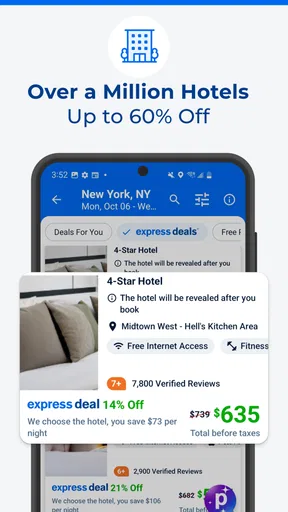
One feature I absolutely love is the "Express Deals." It's like a little surprise gift box where you can get discounted rates on hotels, but the catch is—you don't know which hotel you're booking until after you pay. It’s a bit of a gamble, but if you're adventurous or looking to save some cash, it's perfect.
There’s a practical way to think about that trade-off: a mystery hotel may suit a flexible overnight stop better than a family holiday where you need a particular property, room setup, or neighbourhood. I would set my limits first—how far I am willing to stay from the places I need to reach, and what amenities are essential—then decide whether an unknown hotel is acceptable. If the identity of the property is central to the trip, I’d choose a clearly named option instead.
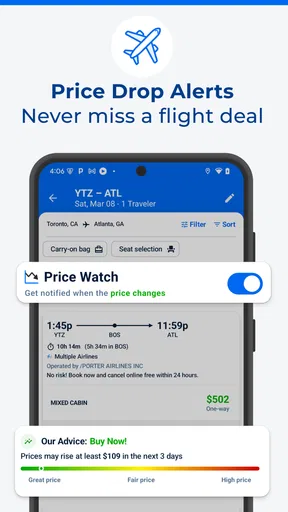
There's also a handy feature for those who love to plan ahead. You can set up alerts for flights or hotels, and Priceline will notify you when prices drop. It's a lifesaver for those of us who love scoring a great deal without constantly checking prices.
For a realistic use case, imagine I have a weekend visit in mind but have not settled on the hotel. I could search around the dates I can travel, save the options that fit, and use an alert rather than repeatedly reopening the same search. If a price changes, I still need to revisit the details and decide whether the new offer works; an alert is a prompt to check, not a reason to book without reviewing the terms.
Booking Made Easy
Booking through the app is a breeze. I found the process straightforward; simply select what you need, input your dates, and voilà! You can even filter your search by price, location, or rating, which is super helpful. Plus, they offer a "Pay When You Stay" option for some hotels, which gives you the flexibility to cancel without losing money.
I would read the cancellation and payment conditions on the specific hotel listing rather than treating “Pay When You Stay” as a blanket rule for every stay. It can be useful when the option is available and the terms match my plans, but I would confirm the deadline and any conditions before relying on it. When dates are uncertain, that check is more important than a small difference in the displayed price.
Filters are most useful when I decide what matters before searching. For a city visit, I might narrow by location first so I am not distracted by a cheaper stay far from my plans; for a flexible road trip, price could be the first filter. I would then compare the remaining choices on their details instead of assuming that the highest rating or lowest cost automatically makes the best fit.
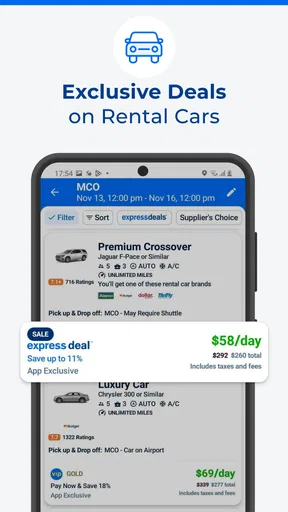
The rental car section is equally impressive. You can compare prices from multiple car rental companies and choose the best fit for your trip. The app even allows you to add on extras like GPS or child seats, making sure you're fully prepared for your journey.
For a car booking, I would compare the rental terms alongside the base price and think through which extras I actually need. A GPS or child seat can matter more than shaving a little off the total if it solves a real need, but I would not add extras automatically. If I already have a reliable navigation plan or do not need a particular accessory, checking the choices carefully helps keep the booking aligned with the trip rather than turning convenience into unnecessary cost.
Who will get the most from it
I’d recommend Priceline to someone who likes comparing several parts of a trip in one place, is comfortable checking booking terms, and wants a free app to begin planning. It can also suit a spontaneous traveller who is open to a little uncertainty and is willing to trade a known hotel name for a possible deal. The app is aimed at general travel planning, and its Everyone age rating reflects that broad audience; the actual decisions about bookings still belong to the person arranging the trip.
I’d be less enthusiastic about relying on it alone if I need a very specific hotel, highly tailored assistance, or a complicated itinerary where every connection and condition needs close coordination. In those cases, I would compare with the provider directly or use a specialist service that better matches the requirement. Priceline’s convenience is strongest when the trip is relatively easy to compare, not when convenience replaces careful coordination.
How it fits beside other travel searches
Compared with searching hotel, flight, and car sites separately, the main appeal here is having those categories together in one app. That makes it convenient for building a first shortlist, but it does not remove the value of checking a provider’s own booking details before deciding. A dedicated airline or hotel app may be the better place to manage a trip when you already know which company or property you want; Priceline is more useful when you are still comparing possibilities across travel needs.
The choice is not necessarily either-or. I’d use Priceline to explore and narrow down options, then take a moment to review the exact terms and total for the booking I’m considering. If a different source gives me clearer conditions or a better fit, I would choose that instead. A useful travel app should help me make a better decision, not persuade me to stop comparing.
A few details worth knowing before you install
Priceline is a Travel & Local app from priceline.com. It is free, has an average rating of 4.7 from around 556,000 ratings, and has been installed over 10 million times. It first appeared on November 10, 2010, and version 14.6.365 requires Android 8.0 or later. Those details suggest it is an established option with a large audience, though popularity alone cannot tell me whether a particular hotel or itinerary will be right for me.
If you are wondering whether you have to pay just to look around, the app itself is free. If you are wondering whether every booking can be cancelled or paid for later, that depends on the particular offer: I would inspect its terms instead of assuming one rule applies across the app. And if your main concern is whether it can help with more than accommodation, its hotel, flight, and car sections make it useful for comparing several basic trip components in one place.
For the best experience, I’d use it with a short checklist: dates, acceptable locations, must-have details, and how much flexibility I need. That makes the filters and comparisons more meaningful, and it helps me spot when a deal’s trade-off is not worth it. I would also keep the confirmation and booking details easy to find after arranging a trip, so I can refer back to the conditions I accepted.
Final Thoughts
Overall, Priceline: Hotel, Flight & Car is a fantastic tool for anyone who loves to travel. Whether you're planning a quick business trip or a long vacation, this app simplifies the entire process. With its user-friendly interface, great deals, and convenient features, it's definitely worth checking out. So, what are you waiting for? Grab your phone, download the app, and start planning your next adventure!
My more measured verdict is that I’d try it as a free planning and comparison tool, especially for ordinary trips where hotel, flight, or car choices are still open. I would not treat a deal label or a convenient search as a substitute for checking the final details, and I would skip an uncertain offer when the trip depends on a specific property or strict flexibility. If that balance sounds right to you, Priceline is worth a place in your travel-planning routine; if you need highly controlled arrangements, compare other options before booking.
Pros
- Easy-to-use interface enhances user experience.
- Comprehensive search filters for precise results.
- Exclusive mobile-only deals for savings.
- Quick booking process for last-minute plans.
- Wide range of travel options in one place.
Cons
- Limited customer support options available.
- Occasional app crashes disrupt booking process.
- Some deals have hidden fees or restrictions.
- Requires internet connection to access features.
- Frequent pop-ups can be distracting.
FAQs for Priceline: Hotel, Flight & Car
What features does the Priceline app offer for booking travel?
The Priceline app provides a comprehensive platform for booking hotels, flights, and rental cars all in one place. Users can access exclusive deals, last-minute discounts, and even name their own price for some bookings. The app also includes features like itinerary management and price alerts to ensure you get the best possible deals.
How does the 'Name Your Own Price' feature work on Priceline?
The 'Name Your Own Price' feature allows users to bid on hotel rooms and car rentals. You enter the price you're willing to pay, and if a partner accepts your bid, your booking is confirmed. While it offers potential savings, note that some details, like the exact hotel name, are revealed only after the bid is accepted.
Can I earn rewards or points using the Priceline app?
Yes, Priceline offers a loyalty program called Priceline VIP, which provides members with additional discounts, exclusive offers, and access to special perks. The app allows you to track your VIP status and benefits, helping you maximize savings and rewards on your travel bookings over time.
Is customer support available through the Priceline app?
The Priceline app provides customer support via multiple channels, including in-app messaging, email, and phone. Users can access 24/7 support for assistance with reservations, cancellations, and any travel-related inquiries, ensuring a smooth and stress-free booking experience.
Are there any fees or hidden costs when booking through the Priceline app?
While Priceline aims to provide transparent pricing, users should be aware of any additional fees that might apply, such as taxes or resort fees, which are typically disclosed during the booking process. It's always a good idea to review the final pricing details before confirming any reservations.


